Showing posts with label INFO. Show all posts

Monday, 6 September 2021

How to use Class Point


Friday, 4 August 2017

Cara semak akaun PTPTN online


  1. Pergi ke laman web www.ptptn.gov.my
  2. Klik pada icon semak penyata pinjaman
  3. Isikan no kad pengenalan dan klik pada penyata kira-kira pinjaman konvensional
  4. Isikan no kad pengenalan dan no pinjaman (call ptptn di talian 0321933000 untuk mendapatkan no pinjaman)
  5. Maka keluarlah penyata yang tetera maklumat peribadi dan jumlah pinjaman terkini
  6. Untuk melihat akaun setiap bulan mengikut tahun, skroll kebawah dan klik ‘lihat terperinci’
  7. Pilih penyata bagi tahun yg di ingini dan senyum..

Tuesday, 1 August 2017

Permohonan membayar PTPTN menggunakan KWSP akaun 2

Tidak perlu pergi ke PTPTN. Permohonan secara online melalui i-akaun dan hanya perlu ke cawangan KWSP sekali sahaja untuk pengesahan ibu jari. Maklumat yang diperlukan untuk permohonan online adalah tarikh mula belajar, tarikh tamat belajar dan nombor matrik
  1. Log in ke I-akaun KWSP 
  2. Di bawah TAB withdrawal pilih e-pengeluaran dan click button new application.
  3. Untuk withdrawal type, pilih education.
  4. Isikan maklumat yang diperlukan seperti di bawah dan nyatakan tarikh mula dan habis belajar.
  5. Pergi ke TAB seterusnya dan isikan maklumat peribadi. Student reference number isikan no matrik atau pun no loan.
  6. KWSP akan menghantar meseg mengatakan permohonan sedang diproses dan pemberitahuan tarikh untuk sah kan cap ibu jari dan bawa dokumen ke KWSP.
  7. Pergi ke KWSP yang berdekatan dengan membawa transkrip dan sijil diploma atau degree (original dan Salinan)
  8. Dapat surat dari KWSP mengatakan permohonan diluluskan.

Wednesday, 25 January 2017

Transistor as Switch

TURNING THE LED ON
1. The objective is to turn on the LED. So we have to start with the forward voltage drop across the LED. Forward voltage is a term that will come up a lot when working with LEDs. This number will help you decide how much voltage your circuit will need to supply to the LED. If you have more than one LED connected to a single power source, these numbers are really important because the forward voltage of all of the LEDs added together can’t exceed the supply voltage.

2. LED only can function at Vf 1.9V to 2.6V. Maximum power rated for LED is (Pmax=100mW). Some datasheet is even helpful enough to suggest a stable current rangeusually 16-18mA. The maximum current through LED, IC is should be not more than:
Pmax=IC X V
IC=Pmax/V; let say the voltage for the LED is 2V
ICmax= 0.125A

So we know that the LED will broken if ICmax=0.125A.

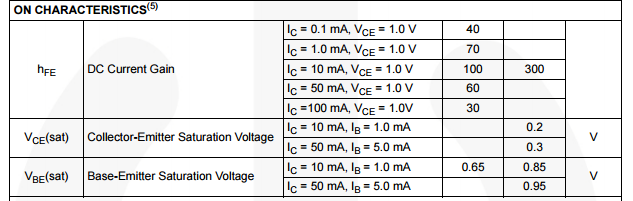
3. Check the transistor 2N3904 datasheet. PD max= 625mW. Ic max=200mA, hfe(beta)=100-300, VBE sat=0.65V-0.85V, VCE sat=0.2V. But for most transistor generally we can use VBE=0.7V and VCE=0V.

4. Make first assumption which is the value of IC to turn the LED on. IC surely must be lower than IC max of the transistor to ensure the transistor not blowing up. Let IC=15mA and Vcc=9V.

5. Then calculate the value of RC to limit the current flowing through collector to 15mA.
RC=VCC-VLED/IC
RC=9-2/15mA=466.67ohm

6. To make sure the resistor not broken power dissipation of resistor has to be lower than maximum power rating of the resistor.

P=IV=(VCC-VLED-VCE)xIC=(9-2)(15mA)=0.105W; whereby VCE=0V

7. To require IC of 15mA to flow through the collector, we must provide the sufficient base current, IB. According to datasheet min hfe=100, so required transistor base terminal to drive LED ON is:
IC=hfe X IB
IB=IC/hfe=15mA/100=0.15mA

8. Calculate the value of RB to limit IB. If you really want to drive the transistor into its fully saturate mode the value of RB must be lower than:

RB=(VCC-VBE)/IB=(9-0.7)/0.15mA=55.33kohm


TURNING THE LED OFF
Troubleshooting:

  • Not sufficient amount of IC running through LED because of IB is not sufficient. IB might be equal to 0 or not achieve the min IB required to drive min IC required to turn the LED ON. Usually in cut off state it said that IB=0A.
  • Transistor is blow up: Because the IC driving through the transistor exceeding the maximum power rating of transistor. Since IB is too large driving IC to be too large until exceeding Pmax.
  • Resistor blow up: because current through resistor consuming power more than power rating of the resistor.

Tuesday, 26 August 2014

How to Embed File in Blog

  • Upload in drive.google.com
  • Right click on the uploaded document-kongsi-awam di web
  • Right click on the uploaded document-buka dengan-pemapar google drive
  • Akan keluar tab window baru utk pemapar google drive
  • Go to file-benamkan pautan
  • Akan keluar embedded code
  • Click copy
  • Paste dalam blogspot create new post (make sure click button html not button compose)
  • Change the code example
<iframe src="https://docs.google.com/file/d/0B43YsvSCqnNsUkFhZmZYd2cyMVE/preview" width="640" height="480"></iframe>

Kepada

<iframe src="https://docs.google.com/file/d/0B43YsvSCqnNsUkFhZmZYd2cyMVE/preview" width="600" height="700"></iframe>

Untuk selaraskan dengan kebesaran blog display


PS: it is advice to upload file in pdf because pdf will make the file to be unchanged. So no misalign word or picture. It will always kept like original. Change word file to pdf can be done in save as menu in the word file toolbar. But need to remember to save the math equation in pdf will have prob if the windows version is lower (if window xp below service pack 3). Windows cannot support the coverted file causing missing equation and etc. so always recheck once convert. Good luckJ

Sunday, 16 March 2014

Otak dan Hati Fighting

"Whats worth fight"

Otak: But what do you want and what to fight for?
Hati: Clear the path and clear the mind.You will find the answer.

Otak: But how if the path is related with time and opportunity?
Hati: Then wait until its come. Nobody could take what is destine for you.

Otak: But if its not coming?
Hati: Meaning it doesnt meant for you. There is surely something beter.

Otak: But how could i know?
Hati: Left the past..Look up for future.. Live the PRESENT..and SMILE:)

The power for the believer


Friday, 10 January 2014

How to Write a Paper

  • The words used is easier to be understood  and error free grammar
  • The arrangement of topic is in order. 
  • Continuous sequence of story making reader addicted to keep reading
  • Have good literature review based on previous method that relates to the title
  • Have mathematical model explaining the method proposed
  • The parameter for simulation purposed is enough
  • The simulation figure is clean and clear
  • Good discussion that explaining the figure well
  • The conclusion proving that the objectives is obtained

Sunday, 13 January 2013

Multiplication of Vector Using Matlab

SPECIAL PRODUCT
vector is a unit having both scalar and magnitude while scalar only have magnitude.
let say we have 2 vector  a=i+2j+3k and b=4i+5j+6k
Using:
1. dot (vector dot vector=scalar)
   y= a.b
     =( (1x4)+(2x5)+(3x6) ) 
     = 32
   matlab command: y=dot(a,b)

2. cross(vector cross vector=vector)
    z=axb
     =(a12b13-a13b12)i - (a11b13-a13b11)j + (a11b12-a12b11)k
     =[ (2x6)-(5x3)]i - [(1x6)-(3x4)]j + [(1x5)-(2x4)]k
     =-3i + 6j -3k
     matlab command: z=cross(a,b)

MULTIPLICATION
2x+9y=5 and 3x-4y=7 can be written as A=[2,9;3,-4] and B=[5;7]

Can be express in form of Ax=B 
where A=[2,9;3,-4]   B=[5;7]    x=[x;y]
Theoretically x=A-1B
    where inverse A, A-1=(1/|determinant A|) x (matrix A but swap position of a11 with a22 and put  negative to both)
    determinant A=|A|=(a11 x a22)-(a12 x a21)

Using matlab, can use either: 
    i. x=A\B   %(backslash)
    ii. x=inv(A)*B    % x=A-1B
    ans: x=2.3714, y=0.0286

Saturday, 12 January 2013

Cara Tukar Range x-axis Dalam Scope (matlab toolbox)

Untuk tukar time offset pada scope dalam matlab toolbox simulation:

Go to simulation tab-configuration parameters-under simulation time change the start time according to the ques specification.

DONE

Friday, 11 January 2013

Modulation Order


How to simulate mobile condition?


WiMAX VS WiFi


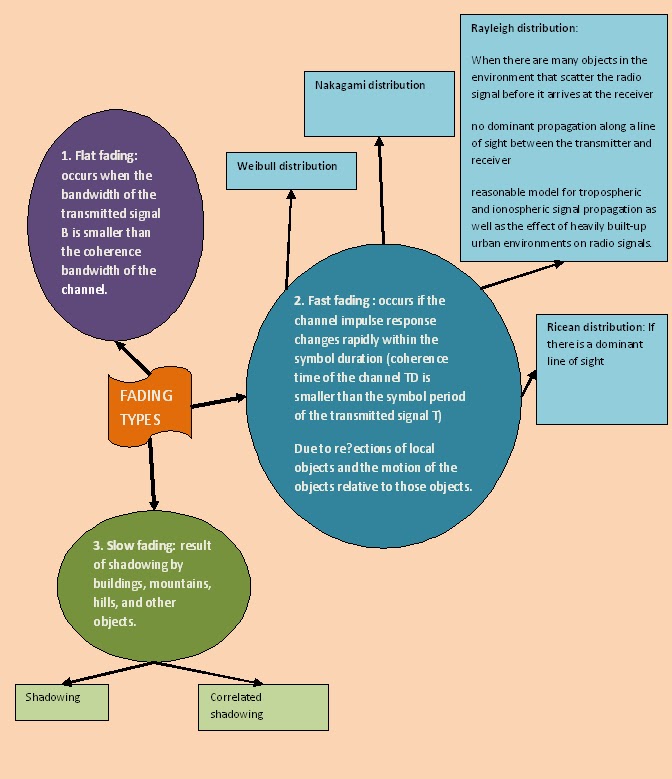
Types of Fading


Thursday, 27 December 2012

What is Flat Fading?


Encoder


Friday, 14 December 2012

Circuit Basic


Thursday, 13 December 2012

Integrals


Derivatives


Trigono


Basic of using ps-pice


1.    To get started:
·         Choose File-New-Project.  When the New Project dialogue box appears make sure that “Analog or Mixed-Signal Circuit Wizard” is selected.

·         Go to icon  to select the part (but make sure you add all the required library first)
·         To rotate-right click or Ctrl+R

3.    Draw wire
·         Go to icon
·         To end the wire push ESC OR right click-end wire

4.    Ground
·         Go to icon  and choose the type according to your circuit
-Any mistakes in placing the part or wire just click on the it and push DEL
-If you want to go back to the previous step from the Edit menu, choose Undo, or click  .
-To get bigger view push I to get smaller view push O
-Common mistakes:
1.    Incomplete circuit: Before running the simulation make sure all the components are connected. To do that simply drag the part anywhere around the screen if the wire is following the part means that it is completely connected.
2.    Do not add space when you write on the value of the part eg:1V
-In the lab session there is only 2 analysis type conducts:
1.     Bias Point (to find V, I and W value without graph)
  • By clicking (enable) all this three boxes   will display the voltage, current and power at certain points within the circuit.

2.    DC sweep (to create graph)
Allows you to do various different sweeps of your circuit to see how it responds to various conditions eg:
·         voltage,
·         current,
·         temperature, and
·         parameter and global
You need to specify a start value, an end value, and increment value.
To change the voltage to current diode go to Plot-axis settings-x axis-axis variable select diode current OR from Pspice-edit simulation file-click on current source
-Labeling Node can be done using aliases. Label your input and output nodes will make your node easier to find.  V(Vout) is simpler than finding V(R1:1). Here is how you do it:
·         Go PlaceàNet Alias… In the dialogue box, type name ‘Vout’ 
·         Next, place the mouse pointer on the wire and click.


P/S:  Additional info can be found at:
http://www.electronics-lab.com/downloads/schematic/013/tutorial/PSPICE.pdf